
Your business may have the right software, experienced employees, and established processes. But if your systems cannot communicate with one another, you could still be losing valuable time, increasing operational costs, and making decisions without complete information.
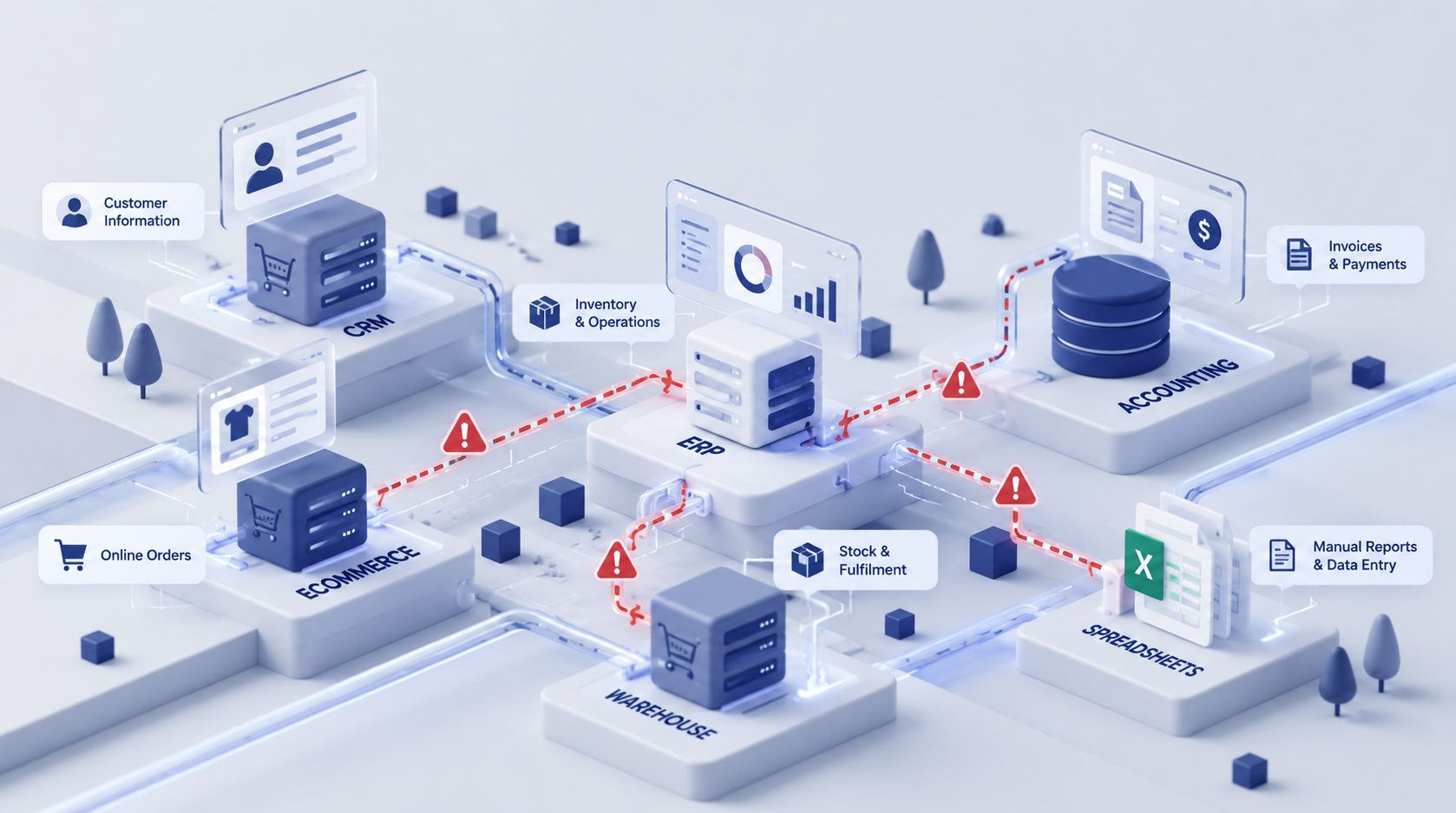
As businesses grow, they often introduce new software to solve individual problems. A CRM manages sales enquiries. An ERP handles finance and inventory. An eCommerce platform processes orders. Accounting software manages financial records, while spreadsheets fill the gaps between applications.
Initially, this approach seems practical. Each department gets the tools it needs, and the business continues to operate.
However, problems emerge when these applications work independently.
Customer information must be entered multiple times. Inventory figures differ between systems. Finance teams spend hours reconciling transactions. Managers wait for reports assembled from different sources. Employees develop manual workarounds because their software does not support the complete business process.
Individually, these issues may seem manageable. Together, they create a hidden operational cost that grows as the business expands.
Disconnected business systems are not just an IT problem. They are a business efficiency, profitability, and scalability problem.
In this article, we explore how disconnected software affects growing businesses, the warning signs to look for, and how ERP implementation, system integration, and custom application development can help build a more connected operation.
What Are Disconnected Business Systems?
Disconnected business systems are software applications, databases, and operational tools that do not exchange information reliably or automatically.
A business might use several capable applications but still struggle to manage its operations because information is trapped in separate systems.
For example, consider a growing distribution business that uses:
A CRM system to manage leads, customers, and sales opportunities.
An eCommerce platform to receive customer orders.
An ERP system to manage inventory, purchasing, and business operations.
Accounting software to manage invoices, payments, and financial reporting.
Spreadsheets to track deliveries, update stock figures, and prepare management reports.
Email and messaging applications to coordinate work between departments.
Each application serves a purpose. The challenge is that they may not share the information required to complete a business process.
When a customer places an order, an employee might need to copy the order details into the ERP, check inventory manually, notify the warehouse, update accounting records, and send the customer a confirmation.
If these steps are not connected, the business relies on employees to act as the bridge between its systems.
That creates unnecessary work, increases the possibility of errors, and makes it harder to maintain consistent information across the organisation.
The solution is not necessarily to replace every application. In many cases, the better approach is to connect existing systems, improve workflows, or introduce a central business platform where appropriate.
1. Duplicate Data Entry Is Consuming Valuable Employee Time
One of the most visible consequences of disconnected business software is duplicate data entry.
When applications do not communicate, employees repeatedly enter the same information into different places.
A sales representative updates a customer record in the CRM. The finance team enters the customer's details into accounting software. The operations team copies the order into a spreadsheet. Someone else updates a delivery tracker.
The same information travels through the organisation, but it must be entered and maintained at every step.
Why does duplicate data entry become expensive?
The cost goes beyond the minutes spent typing information.
Employees must switch between applications, check previous records, confirm that information is correct, and resolve inconsistencies. They also lose time that could be spent serving customers, improving operations, or generating revenue.
Repeated manual entry also introduces opportunities for mistakes.
A customer address may be entered incorrectly. A product code might be mistyped. An order quantity may differ between the sales system and the warehouse record.
These errors can lead to delayed deliveries, incorrect invoices, additional support requests, and unnecessary rework.
Example: A sales-to-operations workflow
Imagine a sales team receives orders through an online store.
Without proper integration:
The order arrives in the eCommerce platform.
An employee downloads or copies the order details.
The details are entered into the ERP.
The warehouse checks the available stock.
The finance team prepares or verifies the invoice.
The sales team contacts the customer with an update.
Some steps may be necessary, but repeatedly transferring information between applications is often avoidable.
With a properly integrated system, order information can flow automatically from the eCommerce platform into the ERP. Inventory, fulfilment, and invoicing workflows can then use that information according to defined business rules.
Employees retain control over exceptions and approvals instead of spending their time transferring routine data.
The business benefit: Less manual administration, fewer avoidable errors, and more time for work that contributes directly to business growth.
2. Inconsistent Data Leads to Poor Business Decisions
Business leaders need accurate information to make decisions about sales, cash flow, stock, staffing, customer service, and future investment.
But when business applications maintain separate records, getting a reliable view of the organisation becomes difficult.
The CRM might show one customer status. The accounting system might contain a different outstanding balance. The inventory system might show available stock that has already been allocated to orders.
Each application may be functioning correctly within its own boundaries. The problem is that the information is not synchronised or interpreted consistently across the business.
What happens when teams work with different numbers?
Consider a business that sells products through multiple channels.
The eCommerce team sees inventory available on the website. The warehouse team maintains a separate stock spreadsheet. The finance team relies on ERP reports.
If inventory updates are delayed, the business may accept orders for products that are no longer available.
The consequences can include:
Order cancellations and delayed fulfilment.
Customer dissatisfaction and additional support work.
Emergency purchasing or stock transfers.
Excess inventory in some locations and shortages in others.
Time-consuming reconciliation between departments.
The same problem affects financial reporting.
If sales, expenses, payments, and outstanding invoices are spread across disconnected systems, management may have to wait for employees to combine the information manually before reviewing business performance.
By the time the report is ready, some of the information may already be outdated.
How connected business systems help
An integrated business environment establishes clear rules for how information moves between applications and which system is responsible for each type of record.
For example, the ERP may act as the primary source for inventory and financial transactions, while the CRM manages sales activities and the eCommerce platform handles the online shopping experience.
Integrations then synchronise the relevant information between these systems.
This does not mean every application needs to store identical information. It means each application receives the information it needs, at the right time, from an appropriate source.
For growing businesses, this can improve reporting consistency, operational visibility, and confidence in management decisions.
To understand how a connected operational environment can work, explore our Business Systems and ERP Solutions.
3. Disconnected Systems Increase Operational Costs
Software costs are easy to identify. Businesses can see subscription fees, licences, hosting expenses, and implementation costs.
The hidden cost of disconnected systems is harder to measure because it is spread across departments and everyday activities.
Employees spend time reconciling information. Managers follow up on missing updates. Finance teams investigate transaction differences. Customer service teams contact other departments for order information.
These activities consume resources even when they do not appear as separate expenses in the accounts.
The hidden costs of disconnected software
Employee productivity costs
Employees spend working hours on manual data entry, spreadsheet maintenance, repetitive reporting, and administrative follow-ups.
Error correction costs
Incorrect records can lead to invoice corrections, order amendments, stock discrepancies, duplicate transactions, and repeated customer communication.
Delayed operational costs
Teams may be unable to complete work until another department provides information or manually updates a system.
Technology maintenance costs
Businesses may maintain unnecessary spreadsheets, scripts, duplicate databases, and manual workarounds to compensate for missing integrations.
Customer service costs
Employees spend more time investigating problems and locating information instead of resolving customer requests efficiently.
Management overhead
Managers must spend additional time checking reports, reconciling figures, and confirming whether information is current.
The important point is that these costs accumulate across the organisation.
A small amount of manual work in one department may not seem significant. But when several departments repeat the same activities every day, the combined impact can become substantial.
How can you estimate the cost?
Start by identifying the repetitive tasks created by disconnected systems.
For each task, estimate:
How many times it occurs in a typical week.
How many employees perform it.
How many minutes each occurrence takes.
The approximate hourly employment cost of the people involved.
How frequently mistakes lead to rework or customer-facing problems.
For example, suppose a team spends a combined 15 hours each week transferring information between applications and correcting related errors.
That represents approximately 780 hours over a 52-week year, before accounting for the cost of rework, delays, or customer dissatisfaction.
This is an illustrative calculation, not a benchmark for every business. Your actual opportunity depends on your workflows, team size, labour costs, and the proportion of work that can realistically be automated.
The purpose of the exercise is to make the hidden cost visible.
Once you understand where the time goes, you can evaluate whether integration, process redesign, ERP implementation, or custom software would deliver a worthwhile return.
4. Customer Experience Suffers When Systems Do Not Communicate
Customers do not care how many applications your business uses internally. They care about receiving accurate information, timely responses, reliable service, and a smooth buying experience.
Disconnected systems can make all of these outcomes harder to deliver.
Imagine a customer contacts your support team to ask about an order.
The support representative has access to the CRM but cannot see the latest fulfilment information. They email the warehouse and wait for a response. The warehouse checks another application and replies later.
The customer waits while your employees try to assemble information that should ideally be available through a connected workflow.
Similar problems occur when:
Sales representatives cannot see the latest payment status.
Customer service cannot access the customer's order history.
Customers receive inconsistent delivery updates.
Account managers work with outdated contact information.
Support teams cannot see relevant details from previous interactions.
These issues can reduce customer confidence, even when your team is working hard to help.
Connecting the customer journey
An integrated CRM, ERP, eCommerce platform, and support system can give authorised employees access to the information they need without requiring them to switch between multiple disconnected records.
For example, a connected workflow may allow a support representative to view customer details, recent orders, fulfilment status, and relevant payment information from a unified interface.
The underlying systems can remain separate where that makes sense. The goal is to make the customer journey more consistent and reduce unnecessary manual handovers.
For businesses operating B2B sales channels, wholesale portals, or multiple eCommerce stores, this becomes particularly important as order volumes and customer expectations increase.
5. Reporting Takes Too Long and Business Visibility Suffers
Many growing businesses have plenty of data but struggle to turn it into useful information.
Sales reports sit in the CRM. Inventory data comes from the ERP. Online revenue comes from the eCommerce platform. Expenses and payments are managed through accounting software.
To prepare a consolidated report, someone exports the information, combines spreadsheets, checks inconsistencies, and prepares the final document.
The process may work when the business is small. As transaction volumes increase, it can become slow, fragile, and difficult to maintain.
Why spreadsheet-based reporting becomes a bottleneck
Spreadsheets are useful tools. They are not inherently a problem.
The difficulty arises when critical business processes depend on manually copying data between spreadsheets and operational systems.
Common warning signs include:
Management reports that take several days to prepare.
Different departments reporting different figures.
Employees maintaining their own versions of the same spreadsheet.
Limited visibility into current stock, orders, or cash flow.
Decisions based on last week's data instead of current information.
A lack of clear ownership for correcting inaccurate records.
When reporting depends on manual consolidation, management spends time questioning the data instead of analysing what it means.
Moving towards better operational visibility
A connected technology architecture can combine information from multiple applications into reliable operational reports and dashboards.
For example, management might want to understand:
Sales performance by product, region, or channel.
Current inventory and outstanding purchase orders.
Order fulfilment progress.
Outstanding invoices and customer payment status.
Customer acquisition and repeat purchasing.
Operational bottlenecks and unresolved exceptions.
The right reporting solution depends on the business. It may involve ERP reporting, a business intelligence platform, API integrations, a data warehouse, or a custom management dashboard.
The key is to establish reliable data flows and clear definitions before building more reports.
Adding a dashboard on top of inconsistent information will not solve the underlying problem.
6. Scaling the Business Becomes More Difficult
A collection of disconnected applications may be manageable when you have a small team, a limited product range, and relatively few transactions.
But growth introduces complexity.
More customers create more records. More products create more inventory movements. Additional sales channels introduce more orders. New locations require better coordination. More employees create additional handovers and approval requirements.
If your systems remain disconnected, operational complexity can increase faster than your ability to manage it.
What does this look like in practice?
A business expanding into another region may need to manage different warehouses, currencies, tax requirements, suppliers, and fulfilment workflows.
A company introducing a B2B eCommerce portal may need to synchronise customer-specific pricing, credit terms, product availability, orders, and account information with its existing ERP.
A manufacturer may need better connections between purchasing, inventory, production planning, quality processes, and financial reporting.
Without a suitable system architecture, each new requirement can introduce more spreadsheets, manual checks, and one-off integrations.
Eventually, the business spends more time maintaining workarounds than improving its operations.
Build a connected foundation for growth
A scalable business technology environment does not necessarily mean buying one large software package.
It means choosing systems with clear responsibilities, designing reliable data flows, and making sure the architecture can support future requirements.
Depending on the business, this could involve:
Implementing an ERP to centralise core operational processes.
Integrating existing CRM, accounting, and eCommerce applications.
Building a custom portal for customers, suppliers, or employees.
Automating repetitive workflows and approval processes.
Creating a unified reporting layer for management.
Replacing fragile legacy applications that restrict growth.
The objective is to reduce operational friction while giving the business room to evolve.
7. Why Adding More Software Is Not Always the Answer
When employees encounter a recurring problem, the natural response is often to search for another tool.
A team may introduce a new project management application to improve coordination. Finance may purchase another reporting tool. Operations may create a spreadsheet to manage information that the ERP does not expose conveniently.
Sometimes, a new application is exactly what the business needs.
However, adding software without examining the underlying process can create another information silo.
Before investing in a new platform, ask three questions.
Question 1: Is the problem caused by the process or the software?
If a workflow contains unnecessary approvals, unclear responsibilities, or duplicate steps, adding another application may simply digitise the inefficiency.
Map the process first and identify what needs to change.
Question 2: Can the existing systems be integrated?
If the applications already support suitable APIs, webhooks, connectors, or other integration methods, connecting them may be more practical than replacing them.
For example, a business may be able to connect its existing eCommerce platform to its ERP and accounting system without rebuilding its entire technology environment.
The feasibility depends on the applications, available interfaces, data quality, security requirements, and business rules.
Question 3: Does the business need a different system or a custom application?
Sometimes, existing software cannot support a critical workflow without excessive workarounds.
In that situation, ERP customization, a custom application, or a purpose-built integration layer may be appropriate.
The right decision should be based on business requirements, total cost of ownership, maintainability, and expected benefits rather than the popularity of a particular technology.
At Akshar Group Technologies, our approach starts with understanding the operational challenge and then determining whether the best solution is to integrate, improve, replace, or build.
Explore our custom software development and AI automation services to see how tailored applications and connected workflows can address business-specific requirements.
8. How ERP Implementation Can Connect Your Business Operations
An Enterprise Resource Planning (ERP) system helps businesses manage core operational activities through a coordinated platform.
Depending on the chosen ERP and its configuration, these activities may include sales, purchasing, inventory, accounting, manufacturing, and other business processes.
Rather than maintaining completely separate records for every department, an ERP can provide shared operational data and structured workflows.
What can an ERP improve?
Centralised operational information
Employees work with more consistent records for customers, products, orders, suppliers, and financial transactions.
Connected business processes
Activities such as sales order processing, purchasing, inventory movements, and invoicing can follow defined workflows.
Improved inventory visibility
Stock movements and order allocations can be tracked through the ERP, helping teams make more informed fulfilment decisions.
More consistent financial records
When operational transactions feed into accounting workflows correctly, finance teams can reduce some forms of manual reconciliation and duplicate entry.
Structured approvals and responsibilities
Businesses can establish approval rules, role-based permissions, and clear handovers for important transactions.
Better management reporting
Shared operational information can support more consistent reporting across departments.
Is ERP the right solution for every business?
No.
An ERP is particularly worth evaluating when a business has growing operational complexity, multiple departments, inventory or purchasing requirements, substantial transaction volumes, or a need to coordinate core business activities.
However, implementing an ERP solely to solve a small integration problem may be unnecessary.
If your existing applications work well but cannot exchange data, targeted integrations may be more suitable.
If your business has a unique workflow that standard software cannot accommodate, a custom application may be a better fit.
A practical assessment should establish which processes need to be connected, which capabilities are missing, and what level of change the business can support.
If you are evaluating ERP for your organisation, explore our ERP implementation and Business Systems services.
9. How System Integration Connects the Applications You Already Use
System integration connects applications so that relevant information can move between them according to defined rules.
Instead of asking employees to transfer information manually, integrations can synchronise records, trigger actions, and reduce repetitive administrative work.
Depending on the systems involved, integration can use APIs, webhooks, supported connectors, scheduled data transfers, or a dedicated integration layer.
Common business system integration examples
ERP and eCommerce integration
Connect an ERP with Magento, Shopify, WooCommerce, or another commerce platform to synchronise relevant products, inventory, orders, customer records, and fulfilment information.
CRM and ERP integration
Share appropriate customer, quotation, sales order, and account information between sales and operational teams.
ERP and accounting integration
Connect financial workflows and transaction records where supported and appropriate, reducing unnecessary duplicate entry and reconciliation.
Payment gateway integration
Synchronise payment status, transaction references, refunds, and order records according to the requirements of the business and payment provider.
Warehouse and logistics integration
Connect warehouse systems, barcode workflows, shipping platforms, and courier services to improve order processing and delivery coordination.
Reporting and business intelligence integration
Bring together data from multiple sources to support consistent reporting and operational analysis.
What makes a reliable integration?
A reliable integration requires more than moving information from one application to another.
It needs clear rules for data ownership, field mapping, validation, duplicate handling, error management, and monitoring.
For example, what happens when an order contains an invalid product code? What if an API request fails? How should the system handle a duplicate event or a stock update that arrives late?
These scenarios must be considered during design and testing.
Without proper error handling, an integration can silently transfer incorrect information or leave records out of sync.
A well-designed integration should make data flows more dependable, provide visibility into failures, and allow authorised teams to resolve exceptions.
10. When Custom Business Applications Make More Sense
ERP systems and off-the-shelf applications cover many common business requirements. But every organisation has workflows shaped by its industry, customers, operating model, and internal processes.
Sometimes, the problem is not simply that two systems cannot communicate. The business may also need a capability that its current software does not provide.
This is where custom business application development can help.
Examples of business processes that may need custom software
Customer self-service portals
Give customers access to relevant orders, invoices, account information, documents, or service requests without relying entirely on email and phone calls.
Supplier portals
Allow suppliers to submit information, view relevant purchase orders, and coordinate activities through a controlled interface.
Internal operational dashboards
Combine relevant information from multiple systems into a workspace designed around the decisions employees need to make.
Industry-specific workflows
Support specialised processes that standard software cannot accommodate without excessive customization or manual workarounds.
Approval and exception management
Create structured workflows for unusual transactions, compliance checks, internal reviews, or escalations.
Integration management tools
Provide a central view of data synchronisation, failed transactions, processing status, and issues requiring attention.
Custom software does not have to replace your existing systems
A custom application can sit alongside an ERP, CRM, accounting platform, or eCommerce store.
For example, a business might retain its existing ERP as the source of truth for inventory and financial transactions while introducing a custom customer portal that communicates with the ERP through secure APIs.
This approach can extend existing software without forcing the business to replace every application.
The important consideration is maintainability. Custom applications should have clear ownership, security controls, documentation, testing, and a plan for ongoing support.
Explore our custom software development services to learn how tailored business applications can support workflows that standard platforms do not fully address.
11. A Practical Roadmap to Fix Disconnected Business Systems
You do not need to replace every application or launch a large transformation programme immediately.
A structured approach can help identify the most expensive problems and prioritise improvements based on business value.
Here is a practical six-step roadmap.
Step 1: Map your current technology landscape
Create an inventory of the applications your business uses.
Include your ERP, CRM, accounting software, eCommerce platforms, warehouse tools, spreadsheets, reporting applications, and other systems involved in important workflows.
For each system, identify:
The department or team responsible for it.
The information it creates and maintains.
The other systems that need that information.
How information is currently transferred.
Any manual tasks or recurring issues.
This creates a clear picture of where information becomes fragmented.
Step 2: Identify the most expensive bottlenecks
Do not attempt to solve every problem at once.
Start with workflows that consume significant employee time, frequently create errors, delay customers, or restrict operational visibility.
Examples include order processing, inventory reconciliation, invoice preparation, customer onboarding, and management reporting.
Estimate the time spent on each process and the consequences of avoidable errors.
This gives you a baseline against which improvements can be measured.
Step 3: Define data ownership and process rules
Before integrating systems, determine which application is responsible for each important record.
For example:
Which system owns product information?
Where should inventory availability be calculated?
Which application maintains customer account details?
Where are financial transactions recorded?
Which system determines order fulfilment status?
The answers will depend on your business architecture.
Defining these responsibilities reduces conflicting updates and helps prevent the same information from being maintained independently in multiple places.
Step 4: Choose the right solution for each problem
Different problems require different approaches.
Business challengePotential solutionCore operations are spread across disconnected applicationsEvaluate ERP implementation or consolidationExisting systems work well but do not exchange dataSystem integration and API developmentStandard software cannot support a critical workflowCustom business application or targeted customizationEmployees repeat predictable administrative tasksWorkflow automationManagement cannot access consistent operational informationIntegrated reporting or business intelligenceExisting applications are outdated or difficult to maintainLegacy modernization or a phased migration
These are starting points, not fixed rules. A proper assessment should consider business priorities, current software capabilities, technical constraints, budget, and future plans.
Step 5: Implement improvements in phases
Begin with a clearly defined business process and a manageable scope.
For example, you might start by integrating your eCommerce platform with your ERP to reduce manual order entry and improve inventory synchronisation.
The project could include:
Mapping the current order workflow.
Defining the data to be synchronised.
Confirming system capabilities and integration requirements.
Building and testing the integration.
Validating error handling and exceptional cases.
Training the affected employees.
Measuring the results after implementation.
Once the workflow is stable, you can extend the approach to other processes.
A phased implementation reduces the risk of changing too many systems at once and gives the business opportunities to learn from each stage.
Step 6: Measure the business impact
Technology improvements should be evaluated against operational outcomes, not simply whether a project has gone live.
Depending on the workflow, useful measures may include:
Time required to process an order.
Number of manual data-entry steps.
Frequency of inventory discrepancies.
Time spent reconciling transactions.
Number of failed or delayed integrations.
Time required to prepare management reports.
Customer response and fulfilment times.
Employee time spent on repetitive administration.
Establish the baseline before implementation and compare it with results after the new workflow has been operating for a suitable period.
This helps determine whether the change is delivering the expected benefits and where further improvements may be needed.
12. How to Know Whether Your Business Needs ERP, Integration, or Custom Software
One of the most important decisions is choosing the right level of intervention.
The goal is not to purchase the most software. It is to resolve the underlying business problem with a solution that can be maintained as the organisation grows.
You may need ERP implementation if:
Multiple departments rely on separate systems for core operations.
Inventory, purchasing, sales, and finance are difficult to coordinate.
Business processes have outgrown spreadsheets and manual tracking.
Management lacks a consistent view of operational performance.
Your existing ERP no longer supports your business requirements.
You may need system integration if:
Your existing applications meet most business requirements.
Employees repeatedly transfer information between systems.
Orders, inventory, customer records, or financial data become inconsistent.
You want to connect eCommerce, CRM, ERP, accounting, or logistics platforms.
You need to automate information exchange without replacing the current technology stack.
You may need custom application development if:
A critical business workflow is not supported by standard software.
Employees rely on complex spreadsheets to manage specialised operations.
Customers or suppliers need a dedicated self-service portal.
Existing applications expose data but do not provide the required user experience.
Standard customization would create unnecessary complexity or maintenance overhead.
You may need a combination of all three if:
Your business has grown significantly and now needs a coordinated operational environment.
For example, an organisation might implement an ERP for core operations, integrate it with its eCommerce and CRM platforms, and build a custom portal for a specialised customer workflow.
These solutions are not mutually exclusive.
The right architecture depends on how your business operates today and what it needs to achieve next.
At Akshar Group Technologies, we help businesses evaluate these options and develop practical solutions around their existing systems, operational requirements, and growth plans.
You can explore our wider range of business technology and digital transformation solutions.
Conclusion: Connected Business Systems Create Room for Growth
Disconnected business systems often begin as a practical response to individual business needs.
One application manages sales. Another handles finance. A spreadsheet fills a reporting gap. A manual process connects the steps in between.
Over time, these small workarounds can become an expensive part of daily operations.
Employees spend hours transferring information. Teams work with inconsistent records. Reporting becomes slower. Customer service suffers from information gaps. Business growth introduces more complexity and additional manual work.
The answer is not always to replace every application with one large platform.
Sometimes, the most effective improvement is to integrate the systems you already use. In other cases, an ERP implementation, a custom application, or a combination of solutions may be more appropriate.
What matters is taking a business-first approach: understand the workflow, identify the bottleneck, define the desired outcome, and choose the technology that addresses the actual problem.
Your business should not have to work around its software. Your systems should work together to support your people, processes, customers, and growth.
Ready to Connect Your Business Systems?
If your team spends too much time on manual data entry, spreadsheet-based reporting, inventory reconciliation, or transferring information between applications, it may be time to review your current technology landscape.
Akshar Group Technologies helps growing businesses implement ERP solutions, integrate existing platforms, and develop custom business applications that support more connected operations.
We can help you assess your current systems, identify opportunities for improvement, and determine a practical path forward.
Let's identify what's slowing your business down and explore how connected technology can help.
Contact Akshar Group Technologies to discuss your requirements.
Frequently Asked Questions
What are disconnected business systems?
Disconnected business systems are applications that do not share information effectively. For example, a CRM, ERP, accounting platform, and eCommerce store may maintain separate records, requiring employees to transfer information manually.
How do disconnected systems affect business productivity?
They can increase duplicate data entry, manual reconciliation, reporting delays, error correction, and communication between departments. The combined impact can reduce the time employees have available for customer service and higher-value work.
What is business system integration?
Business system integration connects applications so they can exchange relevant information and support coordinated workflows. Common examples include ERP and eCommerce integration, CRM and ERP integration, accounting integrations, and connections with payment or logistics platforms.
Does every growing business need an ERP system?
No. An ERP can be valuable when a business needs coordinated management of core operations such as sales, purchasing, inventory, and finance. Businesses with simpler needs may benefit more from targeted integrations or improvements to existing applications.
What is the difference between ERP implementation and system integration?
ERP implementation introduces or configures a platform to support core business processes. System integration connects two or more applications so information can move between them. A business may need either approach or both, depending on its requirements.
When should a business consider custom software development?
Custom software is worth evaluating when standard applications cannot support a critical workflow, when employees rely on complex manual workarounds, or when a business needs a specialised portal, dashboard, or operational application.
Can existing business systems be integrated without replacing them?
Often, yes. If the applications support suitable APIs, connectors, or other integration methods, they may be connected while remaining in place. The feasibility depends on the systems involved, their technical limitations, data quality, security requirements, and the desired workflow.
How do you measure the ROI of business system integration?
Start by measuring the current time required for manual processes, the frequency of errors, the cost of rework, and delays affecting customers or operations. After implementation, compare these measures against the new workflow to estimate the operational benefits and overall return.
How can Akshar Group Technologies help?
Akshar Group Technologies helps businesses evaluate their technology landscape, implement and customize ERP systems, integrate business applications, and develop custom software. The recommended approach depends on the operational challenges, existing platforms, and business objectives.